Skip to content

No satellite TV service - MEO help

Do you have satellite TV and can't watch TV? view how to solve it in the help articles.

For quick support, use the MEO Digital Assistant

For quick support, use the MEO Digital Assistant

More help?

We have more ways to help you. If you can't find what you want in our Help articles, use our other digital channels, such as the App my MEO and the Digital Assistant, or contact us at support lines.

my MEO App

my MEO
my MEO App

Digital assistant

Digital assistant
Digital assistant

MEO Forum

MEO Forum
MEO Forum

MEO Stores

MEO Stores
MEO Stores
Video Tutorials
support lines

No TV service

  • I can't watch satellite TV

    When your TV doesn't have a satellite signal, there are several possible causes:

    • Storms, heavy rain or wind, thick fog or a heat wave can affect satellite signal reception. In these cases:

      1. Wait for the weather to improve
      2. Disconnect the MEOBox from the mains and reconnect it
      3. If the problem persists, contact customer Support (see plan), or customer Support atMEO Empresas (see plan).

    • Obstacles blocking the antenna
      Scaffolding, tree branches or any other object can prevent the signal from reaching the MEOBox. Remove the objects that are preventing signal reception.

    Note: If you notice that the antenna dish has been pushed in or that the antenna is not securely fastened, do not try to move the antenna. Make an appointment for a technician, contact the MEO Helpline (view tariff), or MEO Empresas Helpline (see plan).
  • Satellite TV gives the message "insufficient signal level"

    1. Check the connections of the equipment
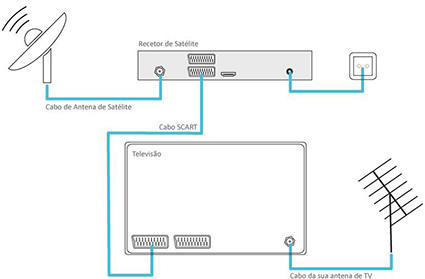
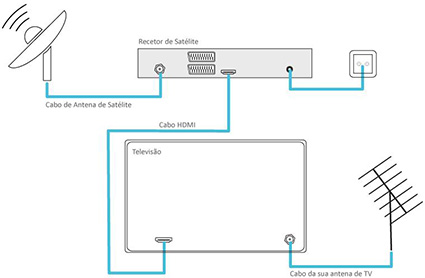
      Check that the SCART and HDMI cables are properly connected, particularly those connecting the MEOBox to the television and the aerial to the MEOBox. Check that the cable that connects to the aerial is correctly plugged in. If in doubt, remove it and reinsert it.

    2. SCART connection


      HDMI connection


    3. Reset the MEOBox to its original configuration

    • MEOBox Full HD or DVR Full HD: Select channel 1 - RTP and go to Menu> Configuration> MEOBox > (PIN 1234) > Advanced configuration > Original configuration > Confirm
    • MEOBox Samsung Full HD: Go to Menu> Configuration> System> Original Configuration> (PIN 1234)

    If the problem persists, contact customer Support (see plan), or MEO Empresas customer Support (see plan).

  • The satellite TV displays the message "software upgrade"

    1. Update the software
    2. As long as the screen with the message "Updating" appears, wait and follow the instructions.
      If the MEOBox locks up during the process or if you can't complete it, switch it to Standby using the box On/Off command.

    3. Upgrade your MEOBox manually
    4. To improve your TV service, you should always have the new software version installed on your MEOBox. This installation is completely free and takes approximately 5 minutes.
      To update the software manually, choose: Configuration > MEOBOX > Enter PIN 1234 > Advanced Configuration > Manual Update 3.

    5. If you still get the message, disconnect the power cable from the MEOBox and reconnect it. The MEOBox should finish updating when you restart it.

    6. If the problem persists, reset the MEOBox to its original configuration:
      • MEOBox Full HD or DVR Full HD: Select channel 1 - RTP 2 and go to Menu> Configuration> MEOBox >PIN 1234) > Advanced configuration > Original configuration > Confirm. 
      • MEOBox Samsung Full HD: Go to Menu > Configuration > System > Original Configuration > (PIN 1234)

    If the problem persists, contact customer Support (see plan), or MEO Empresas customer Support (see plan).

  • The satellite TV has no signal, and an error message appears on the screen

    The tests below aim to help solve the problem by carrying out simple tests.

    If the message on your screen says“Channel not subscribed to,”and your MEOBox has been turned off for a long time, tune to channel 1 and wait 30 minutes for the automatic update to restore service.

    If the problem persists, contact customer Support (see the plan), enter your satellite service number (which you can find on your bill), select the“TV Service Outage” option, and then select“Channel Not Subscribed.”

    If the message on your screen says "No Signal" or "Insufficient Signal Quality," follow these steps:

      1. Check the connections on the devices. Make sure the SCART and HDMI cables are securely connected, specifically: 
          • Connecting the Antenna to MEOBOX, and
          • Connecting MEOBOX to TV.

        If you have any doubts about the correct connection, you can remove it and reconnect it.

      2. Check that you have selected the source (SOURCE) on your TV for the signal you want to view. Ex: If you have the MEOBOX HDMI cable connected to port 1 on the TV, you should select HDMI 1 on the TV.

    SCART connection


    HDMI connection


    • Check the signal strength and noise level (C/N).
      • On the MEOBox Pace (Zapper 3, Zapper 4, DVR3 or DVR 4 models): Select channel 1 - RTP and go to Menu > Configuration > MEOBox > (PIN 1234) > Technical Information > Page 2/4.
      • On the Samsung MEOBox: Select channel 1 - RTP and press the "i" (INFO) button on the Box remote control 3 times.
      • MEOBox Full HD or DVR Full HD: Select channel 1 - RTP and go to Menu > Configuration > MEOBox > (PIN 1234) > Advanced configuration > Original configuration > Confirm
      • MEOBox Samsung Full HD: Go to Menu > Configuration > System > Original Configuration > (PIN 1234).
    LocationC/NPower
    ContinentC/N >=13.5 dB60 dBV
    Azores - western groupCorvo / FloresC/N >=12 dB
    Azores - central groupTerceira / Graciosa, S. Jorge / Pico /FaialC/N >=12.5 dB
    Azores - eastern groupS. Miguel / Santa MariaC/N >=13 dB
    MadeiraC/N >=13.5 dB
    If the power is lower than 58dBµV (on the mainland) and 60 dBμV (on the islands) and the weather is bad, you should wait and if it continues, contact the MEO Helpline (view tariff) when you are next to your MEOBox (see plan).

    Access channel 202. If the power is lower than the reference values in the table and you can't see channel 202, reset the MEOBox to its original configuration:


    If you still can't access channel 202, unplug the MEOBox's power cable and plug it back in.


    If you are still unable to access the Internet on your mobile phone, please contact customer Support (see plan) or customer Support atMEO Empresas (see plan).