If you have difficulties with your Fibre service: TV, Internet or Telephone.
If you'd rather clear the cache manually, follow these steps instead:
1. Unplug and reconnect all equipment.
2. Check that the cables are properly connected, according to your router (FiberGateway or MEO Router).
For FiberGateway, make the following checks:
[1] Check that your MEOBox is connected to the mains (C) and that the ON/OFF button (D) is in the ON position (green lights on);
[2] Check that the network cable (A) connecting the MEOBox to the Router is correctly connected.
[3] Check that your FiberGateway is plugged in (F) and that the ON/OFF button is in the ON position (E);
[4] Check that the cable connecting the FiberGateway to the white box (G) is correctly connected and the RF cable connected to the TV, and that they are not bent; I don't have this connection.
[5] Check to see if thecable connecting the FiberGateway to the computer or Smart TV (H) is properly connected; we should explain why you should connect the PC or Smart TV via cable. Most people have a Wi-Fi connection.
[6] If the problem is with your landline (I), also check its connection to the FiberGateway.
[7] Make sure theHDMI cable (B) is properly connected and that the HDMI source selected on your TV is the same one connected to the MEOBox;
________________________________________________________________________________________________
For the MEO Router, check: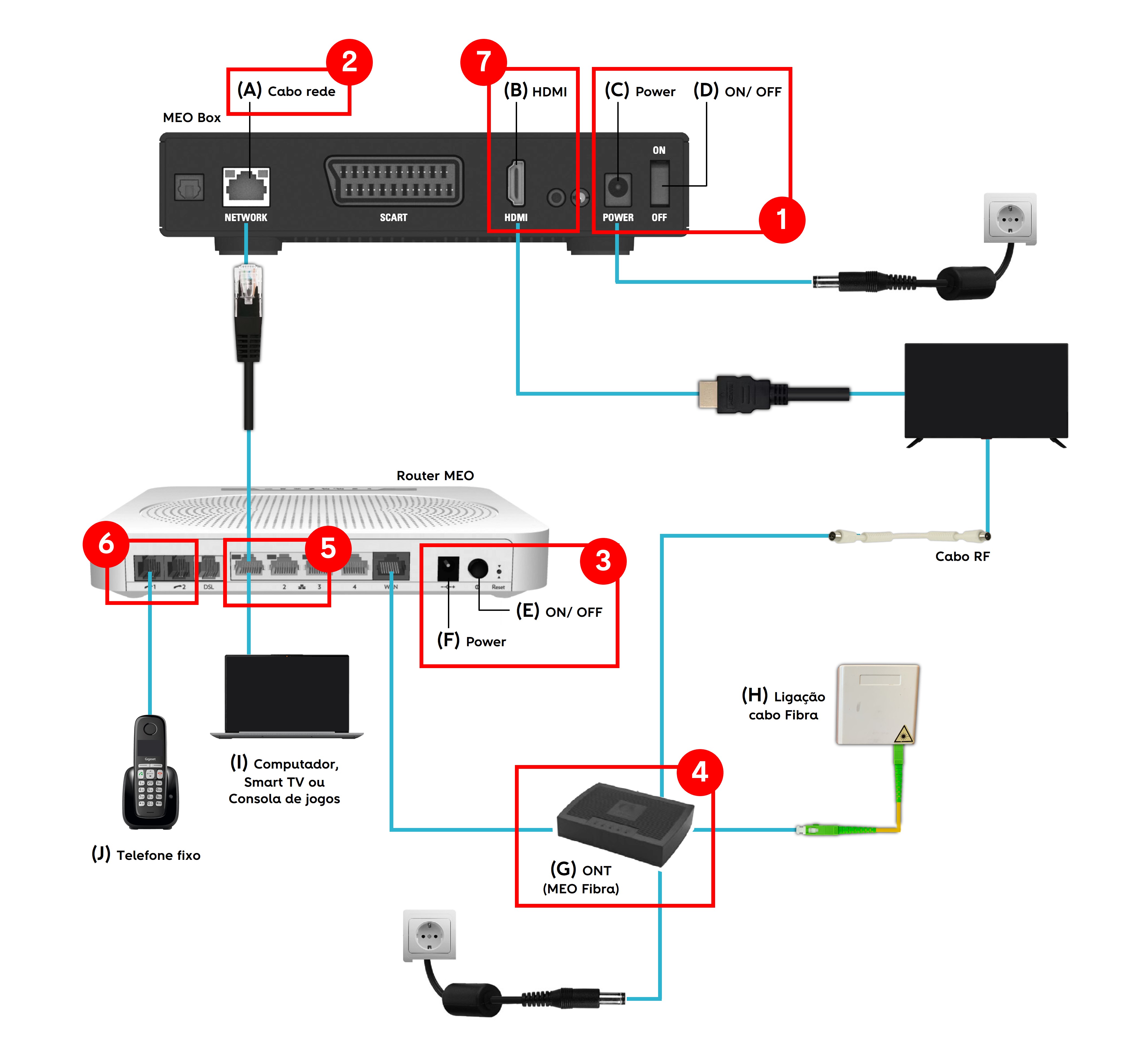
[1] If your MEOBox is plugged in (C) and the ON/OFF button (D) is in the ON position (green lights on).
[2] If the network cable (A) connecting the MEOBox to the Router is correctly connected.
[3] Your Router is connected to the mains (F) and the ON/OFF button is in the ON position (E).
[4] The cable connecting the ONT (G) to the white box (H) is correctly connected.
[5] The cable connecting the Router to the computer, Smart TV (I) is correctly connected.
[6] If the problem is with your VoiP (J) phone , also check your connection to the router.
[7] Check that the HDMI cable (B) is correctly connected and that the HDMI source chosen on your TV is the same as the one going to the MEOBox.