Skip to content

Routers and Extenders - MEO Help

Discover MEO routers and extenders and the differences between them. Find out how to install the MEO extender.

For quick support, use the MEO Digital Assistant

For quick support, use the MEO Digital Assistant

More help?

We have more ways to help you. If you can't find what you want in our Help articles, use our other digital channels, such as the App my MEO and the Digital Assistant, or contact us at support lines.

my MEO App

my MEO
my MEO App

Digital assistant

Digital assistant
Digital assistant

MEO Forum

MEO Forum
MEO Forum

MEO Stores

MEO Stores
MEO Stores
Video Tutorials
support lines

Routers and Extenders

  • What the MEO Smart WiFi Extender is and what it's for

    The MEO Smart WiFi Extender is a device exclusive to MEO that ensures Best whole-home Wi-Fi MESH coverage, creating a smart network with FiberGateway or Fiber X routers.
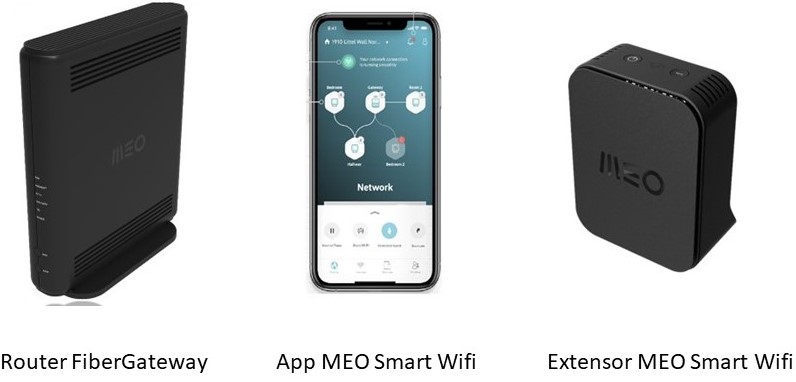


    Using Smart WiFi technology , you can enjoy the best home internet service, with a single, smart, and reliable Wi-Fi network that allows for mobility without connection drops.

    With MEO Smart WiFi, you no longer need to choose which networks (Ethernet, Wi-Fi, 2.4 GHz, 5 GHz, or 6 GHz) to use in each area of your home and for each device. The MEO Smart WiFi Extender makes that choice for you, expanding coverage throughout your home so you can listen to music, make video calls, or play games without interruptions as you move around the house.

    It also allows you to connect TV set-top boxes (MEOBox, Apple TV, Android TV) via Wi-Fi in any room of the house, connect older devices to Wi-Fi through the two GbE ports available on the MEO Smart WiFi Extender, and easily connect devices to the MEO Smart WiFi network via WPS.

    For most homes with up to two stories that already have a FiberGateway router, a single MEO Smart WiFi Extender is sufficient. However, if your home has more than one floor, we recommend one for each floor, up to a maximum of 4 MEO Smart WiFi Extenders. In multi-story homes, it may be necessary to connect some of the MEO Smart WiFi Extenders using an Ethernet cable.
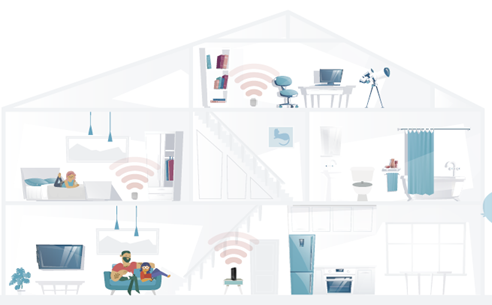


    Installation is quick, and with the MEO Home app , you’ll see a recommendation for the best location for your MEO Smart WiFi Extender. 


    This equipment is exclusive to MEO and is only available to MEO Fibre customers with FiberGateway or Fiber X routers. Find out more.


    If you have another MEO router, we recommend using a range extender to improve Wi-Fi coverage in your home. Learn more or buy online.

  • Rent MEO Smart WiFi 6 Extender

    Rental is available for customers with internet Fibre that have FibreGateway or Fibre X routers.
    The request can be made through the support lines (see plan), or support lines MEO Empresas (see plan) and the equipment will be shipped to the address provided. Alternatively, delivery can be made by courier (faster) or by a technician (for installation after on-site coverage analysis), for an additional fee.

    After delivery, the monthly fee of €4 per unit (VAT included) will be added to your MEO service bill.

    This rental has no retention period. You can try it out without obligation and if you're not satisfied you can return it to a MEO store and end the rental.
  • MEO Smart WiFi 6 Extender installation and technical support

    You can install " MEO Smart WiFi 6 Extender " quickly and easily with the MEO Home app— here's how.
    In the event of a fault, MEO Smart WiFi 6 Extender will be replaced by another at no extra cost, provided it is in one of the following conditions:
    • Equipment for hire;
    • Equipment purchased and within the warranty period.
    Call MEO Technical Support (see the plan) or MEO Empresas Technical Support (see plan).
  • Difference between MEO Smart WiFi Extender and MEO Smart WiFi 6 Extender

    The MEO Smart WiFi 6 Extender (model D2260G) is compatible with WiFi 6 Mesh technology, which—compared to the MEO Smart WiFi Extender (model D2150G, compatible with WiFi 5 Mesh)—also offers the following additional features: 
    • More equipment at the same time
    • Greater coverage and more speed 
    • Better performance in congested environments
    • More security 
    • Lower energy consumption
    The benefits of the MEO Smart Wi-Fi 6 Extender apply to all devices with a Wi-Fi connection, even if they aren’t Wi-Fi 6-compatible. Wi-Fi 6 devices naturally provide a better experience. The MEO Smart Wi-Fi 6 Extender is also compatible with Fiber X (model XSR151DK) and Fiber X7 (model XSR240LNR), unlike the MEO Smart Wi-Fi Extender (model D2150G), which works only with the Fibergateway (GR241AG) and the Fibergateway Wi-Fi 6 (model GR141DG).

    All other features and functions of the MEO Smart WiFi Extendercan be found at MEO Smart WiFi 6 Extender .

  • Withdrawal from MEO service and return of MEO Smart WiFi Extenders 6

    If you leave MEO customer you will have to return all the equipment owned by MEO and in your home, including MEO Smart WiFi 6 Extenders, routers and MEO Boxes.

    If you've rented two MEO Smart WiFi 6 extenders but only need one, you can return one of them at aMEO store.

  • Features and compatibility of Fiber X and Fiber X7

    The Fiber X and Fiber X7 routers enable instant downloads, uninterrupted teleworking, high-resolution streaming and latency-free gaming.

    The Fiber X router offers Wi-Fi 6 and the Fiber X7 router offers Wi-Fi 7 Triband. Both have 10 Gbps technology. The 10 Gbps LAN port is auto-sense, allowing you to connect devices with 1, 2.5, 5 or 10 GbE Ethernet ports.

    Fiber X is only compatible with the MEO Smart WiFi 6 Extender. Fiber X7 is compatible with MEO Smart WiFi 6 and 7 Extenders.

  • What a WiFi repeater is and what it's used for

    A Wi-Fi repeater allows you to extend wireless coverage in a specific area of your home or business.

    • Plug&Play use
    • Guarantees a speed of up to GB/s, depending on the speed of your internet access
    • Saves the networks you've already connected to


    You can buy a WiFi repeater in the Online Shop or via customer Support (see the plan). If you are aMEO Empresas customer , use the MEO Empresas Helpline (see the plan).

    Access the quick installation guide forthe Devolo AC Dual Band Wi-Fi Repeater.

    Example of use:

  • I already have a FiberGateway or Fiber X router, can I exchange it for a newer model?

    Yes, you can request to exchange your current FiberGateway or Fiber X for a newer model—such as the FiberGateway WiFi 7 or the Fiber X7—through theMEOsupport lines  (see the plan), or through support lines MEO Empresas (see the plan) for a fee covering the technician’s service call (€50, VAT included) and the router rental.
  • What is the difference between Fibergateway and Fibergateway WiFi 6?

    Compared to Fibregateway, Fibregateway WiFi 6 allows:

    • More devices connected simultaneously at maximum speed, even on non-WiFi compatible devices 6

    • Better energy management capacity and, consequently, lower consumption

    • Greater security. 

  • How do I know if my devices (Smartphone, PC...) are compatible with WiFi 6?

    Many recently launched devices are compatible with WiFi 6.

    To find out if your devices (Smartphone, PC...) are compatible, check their features for the "Wi-Fi 6" symbol or an indication that they are compatible with the 802.11ax WiFi standard.


  • What is WiFi 7?

    WiFi 7 (IEEE 802.11be standard) is the latest innovation in wireless technologies and is available in the Fiber X7 , FiberGateway WiFi 7 routers and the MEO Smart WiFi 7 extender. This technology supports various 2.4 GHz, 5 GHz and 6 GHz bands, which allows for several improvements over previous ones: 
    • Higher speed
    • Greater stability of devices connections
    • Greater number of connected devices
    • Greater efficiency
    • Greater security
    • Significant reduction in latency
    • Less congestion
    • Lower energy consumption

    An important innovation is the availability of the 6GHz band, which offers a new dimension of speed and performance for your WiFi network, as well as greater bandwidth, less interference, greatly reduced latency and support for a greater number of devices connected at the same time. Check if your device is compatible with WiFi 7 Triband.

    Unlike other Wi-Fi 7 options on the Brazilian market (which lack the 6 GHz band and 320 MHz channels), MEO unlocks the full potential of this new standard with its Wi-Fi 7 Triband implementation. This innovation ensures the best experience for virtual and augmented reality, real-time high-definition streaming, and demanding cloud computing applications.

    Don't miss out on this new innovation.
  • Which devices support WiFi 7 Triband? 

    To find out which devices (smartphone, PC, ...) are compatible with WiFi 7 Triband technology, you should check the specifications for the symbol or designation "WiFi 7" or reference to the "802.11be" standard, and check whether the device supports the 2.4 GHz, 5 GHz and 6 GHz bands. If the device only supports the 2.4 GHz and 5 GHz bands, even if it is WiFi 7, you won't be able to access all the advantages of this technology, as it lacks the ability to take advantage of the 320 MHz channel width and the 6 GHz band. 

    On the other hand, if the device does not have WiFi 7, but has access to the 6 GHz band, i.e. if it is WiFi 6 Triband (WiFi 6E), it will not be able to use the features that are part of WiFi 7, but it will be able to access the improved speed and efficiency provided by the availability of the 3 frequency bands (2.4 GHz, 5 GHz and 6 GHz).

  • What are the differences between WiFi 6 and WiFi 7 Triband?

    WiFi 6 brought a revolution in the way we connect to the internet, but WiFi 7 Triband raises the standard of connectivity even further, offering significant improvements that will transform your online experience. 
    • Unparalleled speed: WiFi 7 Triband enables higher data transmission speeds thanks to its 6 GHz band and 320 MHz bandwidth. This means instant downloads and uninterrupted 4K and 8K streaming.
    • Efficiency and Capacity: WiFi 7 is not only faster, but also more efficient. The wider channels of up to 320 MHz guarantee a stable connection with very low latency, even in environments with many connected devices.
    • Less Congestion: The 6 GHz band in WiFi 7 Triband offers less interference and congestion on your home network.

  • In which bundle and how can i get FiberGateway WiFi7 and Fiber X7 routers?

    You can order the FiberGateway WiFi 7 router when signing up for MEO's "bundles " plan at Fibre. The Fiber X7 router can be ordered when signing up forMEO's " bundles " plan at Fibre 10 Gbps Speed Edition. 
    When choosing these routers, the value of €4.99/month will be added to the value of the bundle MEO selected.

    If you have a bundle compatible, you can exchange your current router for one of the new WiFi 7 routers, paying for the technician's trip and the amount of €4.99/month on your bundle MEO.

    Note: The FiberGateway WiFi 7 and Fiber X7 are not compatible with RF (coaxial cable) TV service. If you want to watch TV without using a Box, you must use aSmart TV that is compatible with the MEO app on TV.
  • What's the difference between the Fiber X router and the Fiber X7?

    The main difference between the Fiber X router and the Fiber X7 is that the new Fiber X7 router features WiFi 7 Triband technology, including a 6 GHz band, which enables WiFi connections of up to 10 Gbps and lets you take full advantage of the benefits of true WiFi 7:
    • The best wireless internet experience
    • More speed and more connected devices, always with maximum reliability
    • Significant reduction in latency
    • More coverage and better performance throughout the house
    • More simplicity and more security
    • More inclusive and functional design
    • More sustainability and energy efficiency

    The Fiber X7 is compatible with the new MEO Smart WiFi 7 Extenders, which allow you to bring Triband WiFi 7 quality to everyone and every corner of your home. The Fiber X7 router can also be connected to the MEO Smart WiFi 6 Extenders while maintaining the extender's functionality.

    Note: The Fiber X7 is not compatible with the RF TV service (coaxial cable). If you want to watch TV without using a Box, you must use a Smart TV compatible with the MEO app on the TV. 


    If you own or purchase Wi-Fi 6E or Wi-Fi 7 devices, there are advantages to having the Fiber X7 router. By using the 6 GHz band on these devices, you can fully or partially free up the 2.4 and 5 GHz bands for any older devices you have at home.  Since 2022, all new high-end communications devices have supported Wi-Fi 6E, and starting in 2025, the same will be true for Wi-Fi 7 support. Currently, any new mid-range device supports Wi-Fi 6E, and the same will soon be true for Wi-Fi 7.


  • Can I use the MEO Smart WiFi 6 extender with the FiberGateway WIFI 7 router or the Fiber X7 router?

    If you have a MEO Smart WiFi 6 extender (model D2260G), you can still use it with the new FiberGateway WiFi 7 and Fiber X7 routers. To do this, simply pair it with the new router, via WiFi or cable. It is worth noting that the extender will continue to support connections from WiFi 6 compatible devices.

    In the case of the older MEO Smart WiFi Extender (model D2150G), which only works on WiFi 5, compatibility is no longer guaranteed.