Skip to content

Understanding your invoice - MEO Help

Do you have any questions about the charges on your monthly MEO invoice? Explore our articles explaining the invoice details

For quick support, use the MEO Digital Assistant

For quick support, use the MEO Digital Assistant

More help?

We have more ways to help you. If you can't find what you want in our Help articles, use our other digital channels, such as the App my MEO and the Digital Assistant, or contact us at support lines.

my MEO App

my MEO
my MEO App

Digital assistant

Digital assistant
Digital assistant

MEO Forum

MEO Forum
MEO Forum

MEO Stores

MEO Stores
MEO Stores
Video Tutorials
support lines

Understanding the invoice

  • Why is my MEO bill higher?

    If you received a bill for a higher amount than expected, start by using the Bill Comparator in the my MEO app to see where the increase came from.

    In the app my MEO :

    • Select Invoices

    • Sign in

    • Select " Compare invoices"

    • See how much you're overpaying and the reasons why

    Below are the most common reasons why a MEO bill might be higher than usual.

    Print from the my MEO app my MEO the "Bills" tabPrintout from the my MEO app my MEO the monthly billing statementScreenshot from the my MEO app my MEO the bill comparison tool


    First bill after installation

    The first bill may be higher because:

    • Includes the days of use from installation through the end of the month

    • It also includes the next month's payment.Here's how the first bill is calculated.

    • It may not yet reflect the negotiated offers, or the offers may differ

    We recommend reviewing the contract summary in the app at my MEO and confirming the associated offers. If there are any discrepancies, please contact Customer Support at customer(see the plan) or, for business customers accounts, the support lines MEO Empresas (see the plan).


    Changes to the service

    Your bill may be higher if you've made changes to your service, such as:

    • bundles upgrade

    • Join premium channels

    • Addition of equipment, such as mobile phones

    These changes are automatically reflected in your billing.Here's what the invoice looks like after a change: bundle.


    End of promotional offers

    When a promotional campaign or the " retention period" offer ends, the service will be billed at the regular rate.
    The end date of the offers can be confirmed in the contract summary available in the app my MEO.


    Data usage outside the bundle

    • There may be usage not included in bundle , such as:

      • Multimedia Messaging (MMS)

      • Roaming calls (calls made and/or received when you are outside Portugal)

      • Calls to international numbers (Voice - International)

      • Calls to 761 numbers (Voice - MEO 761 calls)

      • Calls to 808 numbers (Voice - Calls 808 Other Operators)

      • Calls to customer Support (Voice - customers Support)

      • Value-added services (e.g. calls to special numbers).

    If the bill does not show the details of the calls, you can change the level of detail on the bill in the app atmy MEO.

    Charges exceeding the credit limit are only applied if the “ extra monthly fee ” value is set to a number greater than zero. These charges are billed on the following month’s statement. The “ extra monthly fee ” limit can be changed in the app at my MEO. 


    Subscriptions or purchasing content online

    • Games, apps or services that can be activated by mistake while browsing the internet or via text, but which require a monthly fee.

    • In your customer my MEO, you can check whichservices you've subscribed to,cancel them, and even block future subscriptions.


    Administrative Services, Penalties, and Compensation

    In the event of a late payment:

    • A penalty and compensation forlate payment are imposed

    • If the payment is more than 2 bills overdue, service will be suspended

    • A reconnection fee applies when service is restored

    These amounts appear in the MISCELLANEOUS > ADMINISTRATIVE SERVICES section of the invoice.


    Amounts from previous invoices or installments

    The invoice summary may include:

    • Amounts owed from previous months

    • Equipment rentals

    • Installment payment agreements

    If a payment was made after the invoice was issued, the amount may still appear on the next invoice. In such cases, you should pay only the amount for the current month and use the "MB" reference number listed on the invoice.

    This section will also display the amounts forequipment purchases made on an installment basisand any installment payment agreements you have entered into. If you miss any of these payments, the amount will be added to your next invoice.

    In the case of installments for the purchase of equipment, if you miss two installments, the next invoice will show the total amount due, not just the 3 installments.

    If you miss an installment of a payment agreement, the following month the amount to be paid will correspond to the entire debt.


    Annual tuition adjustment

    Tuition fees are subject to annual adjustments as required by law. These changes are communicated in advance via invoice or text. 

    You can view your bills at any time onthe my MEO app, where aninteractive billis also available to help you better understand its details.


    How to check invoice details 

    Understanding roaming billing

  • Understanding the 1st MEO Invoice: What you need to know

    Your first MEO bill may show a different amount than usual, as it may include charges prorated based on the number of days the service has been active. How the first bill is calculated depends on the type of service you signed up for.

    Below, we explain how the initial billing for MEO’s main services works.


    First bill for a MEObundle

    bundles are billed in the month they are used.

    This means that:

    • In January, pay for January

    • In February, pay for February, and so on

    On the 1st invoice, you can pay:

    • The month in which the invoice is issued

    • Plus the number of days of use from the previous month, if the installation took place before the invoice was issued

    The billing period is always indicated on the back of the invoice.


    Billing examples on the first invoice:

    1. Invoice issued in the same month as installation

    If the bill is issued in the same month as the installation, it includes only the days of usage from the installation date through the end of the month.

    Example: Installation on January 6 → Invoice issued on January 19 → Paid on January 25. 

    The fee covers the period from January 6 through January 31 (25 days).

    Calculation formula: ( monthly fee ÷ 30 days) × number of days of active service


    2. Invoice issued in the month following installation

    If the installation takes place in one month and the invoice is issued the following month, the invoice includes:

    • The days of use in the month of installation,

    • The full monthly payment for the following month (the month the invoice is issued).


    Example: Installation on January 27 → Invoice issued on February 10 → Covers the days in January (27–31) + the entire month of February.

    You will be charged for January 27–31, plus the full monthly fee for February.


    Important notes regarding the first invoice: 

    • This billing model applies to all monthly fees for MEO services

    • Charges not included in the monthly bill (such as international calls, roaming, premium-rate numbers, MMS, or additional usage) appear in the Usage section

    • Usage not included in the monthly fee is billed in the month following the month of usage


    Mobile Internet Bill for PC or Tablet

    The first Mobile Internet bill is issued in the month following service activation and includes:

    • The prorated amount for the month in which the service is activated

    • The full monthly fee for the month in which the invoice was issued

    Example:

    Activation on August 25 → September bill 

    Includes August 25 through 31 (7 days in August) + the September monthly fee.

    ⚠️ Your first bill will be higher than usual. Starting with your second bill, the amount will return to normal.


    Mobile Voice Service Bill

    The first bill for the Mobile Voice service is issued in the month following activation, and:

    • Includes only the days of use from the previous month

    • It will be lower than usual.

    Starting with the second invoice, the amount will be standard

    Example: Activation on August 25 → September bill 

    It includes only the days from August 25 through 31 (7 days in August).


    Get to know MEO's product invoices in an interactive way.

    Find out how to check your invoice.

  • Understanding the invoice after changing services (for bundle with mobile phone)

    When you change services, we adjust the amounts charged on your invoice. This information appears in the "Monthly Fees" section.

    We present 2 different cases with an explanation of how the calculations are made:

    Case 1 - A change in your service occurs before the day your invoice is issued.
    In this case, you will pay for the days you used your old bundle plus the days you used the new bundle until the end of the month.
    For example, if you signed up for the service on the 6th, then you'll pay for 5 days of the old bundle plus 25 days of the new bundle.
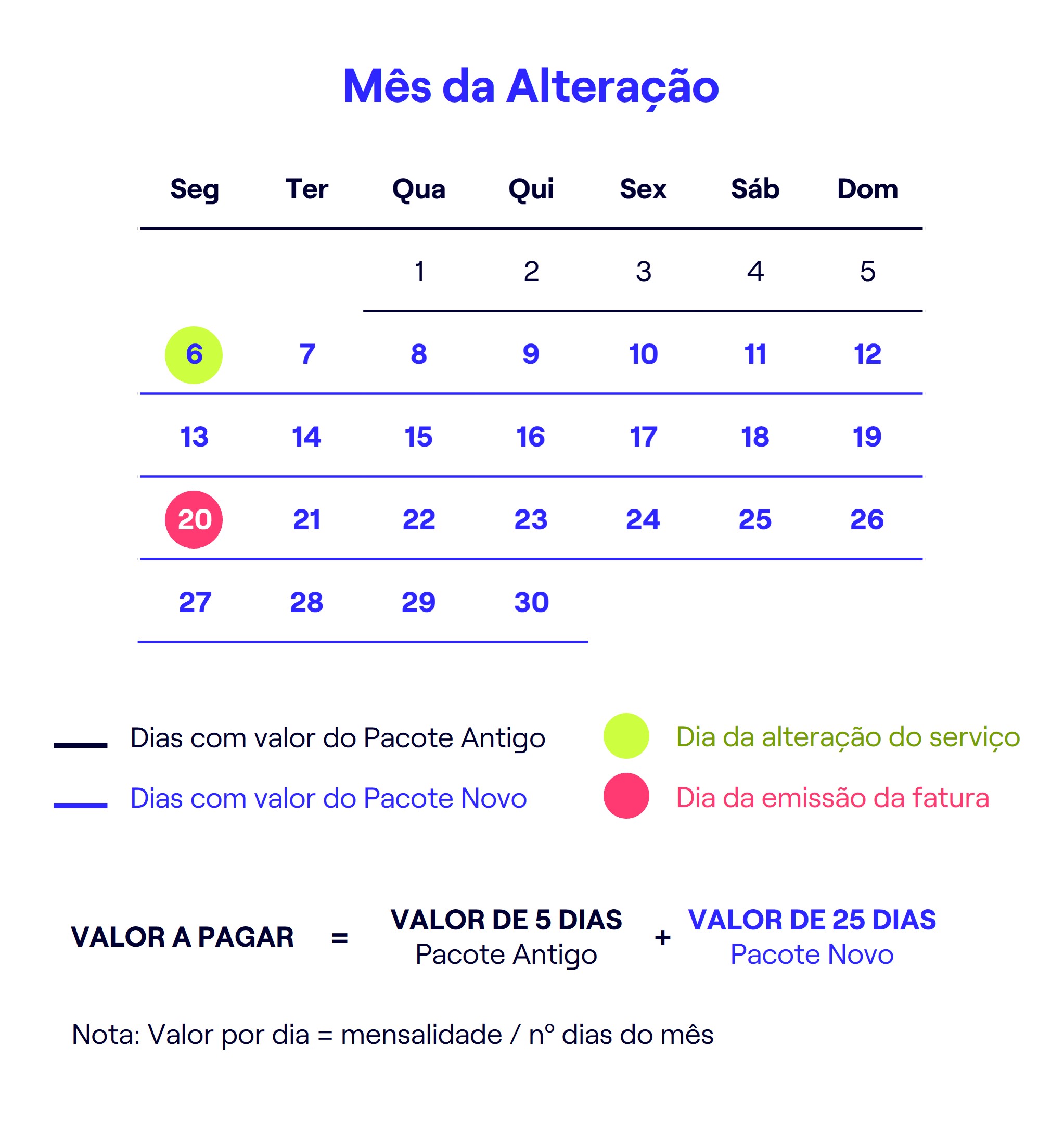

    Case 2 - Change in your service occurs after the day your invoice is issued
    Here the bill will be adjusted as follows: in the month of the change, you will pay for the old bundle as normal, since the bill had already been issued. The following month, you will be charged the monthly fee for the new bundle, plus the days you used the new bundle in the previous month and minus the days of the old bundle that you had already paid for but not used. This adjustment ensures that you only pay for the days actually used.
    For example, if you change your service on the 27th and your invoice is issued on the 20th, in the month following the change you will pay 4 days of the month of change + monthly fee for the following month - 4 days that you had already paid for the old bundle in the month of change.


    If you have added a pay-monthly service to your bundle with mobile phone, you will receive two invoices the following month:
    • Your last invoice from plan Post-Paid with the days you used the service up to the date of the change, i.e. the consumption made and the monthly fee for that period.
    • The invoice for the service bundle with mobile phone already with the new mobile phone.


    Find out how to check your bill.
  • Understand the details of communications at Roaming on the invoice

    When you make communications on Roaming, the records shown on your invoice have some differences from national communications.

    Information that can help clarify doubts:

    • All records of communications you make abroad have the date and time of Portugal.
    • The letter codes before the connected number identify the country and foreign operator whose network you were using. See the table for the meaning of all the country and operator codes.
    • Communications labeled 'TERMINATED' are all calls you have received from abroad. To ensure the confidentiality of the caller, we cannot provide this information.
    • The voice messages you receive on your Voice Mail when you are abroad (other than in the European Union, Iceland, Norway or Liechtenstein) correspond to two calls with the same date/time:
      1. One corresponds to the routing of the call from the MEO central office to the operator in the country where it is located (call ended in roaming
      2. Another is the forwarding to Voice Mail (a call made to Portugal).


    Records with a duration of zero are written messages sent (text). These messages are charged according to the plan of roaming subscribed.

  • Understanding the Payment Plan for MEO equipment and service instalments on the invoice

    MEO invoices are charged for instalments relating to the purchase of devices on instalments and services referred to as Instalment Agreements.


    Where the instalments appear on the invoice :
    • The Account Summary shows information on:
      • Previous instalment values
      • Total amount owed
      • Last payments made.
    • The Detail (2nd page of the invoice) shows information on:
      • No. and amount of the benefit to be paid on the invoice in question.
      • Total Value of the Payment Plan that remains outstanding after payment of the current instalment

    Note: If you do not have direct debit, in equipment instalment payment plans, the information on the Installment Balance and Installment for that month are indicated on the Account Statement.


    Deadline for payment:
    - Equipment Installment Payments: The due date for paying your monthly MEO service bills and your equipment installment payments is the same. Therefore, if you pay by direct debit, the monthly payment for the equipment installment and the service fee will be debited from your bank account on the same date.

    - Installment Agreements: The payment due dates for the monthly service bill and the installments under the Installment Agreement are different:
    • The deadline for payment of the monthly bill for the MEO service is the one on the document itself;
    • The deadline for payment of the instalment is the one sent in the Debt Acknowledgment document when payment in instalments was agreed and always occurs on the same day of the month.
    This means that if you pay by direct debit, the charges will be processed on different dates. If you pay by another method, please be sure to note the agreed-upon payment date for each installment; although it does not appear on the bill, it must be honored.


  • Penalty for late invoice payment

    If the invoice payment due date is exceeded by 3 days, a fee of €5 (not subject to VAT) may be charged as compensation for breach of contract on the following month's invoice.

    You will receive a notice (by mail or e text) stating that you have 30 days to pay the outstanding amount. If you do not make the payment by the end of that period, your service will be suspended. This notice is sent 3 days after the payment due date.


  • Service restoration cost

    After the service is suspended due to nonpayment, a fee will be charged to reactivate it. This fee varies depending on the product.:


    Cost of re-establishing MEO service Consumption
    Service Restoration Mainland / 23% VAT Madeira / 22% VAT Azores / VAT 19%
    Meo bundles , Telephone, Fixed Internet

    €17,50€17,36€16,79
    mobile phone, mobile Internet
    €9,00€8,93€8,64


    In the case of MEO Customers Empresas , these will be the service reestablishment values:


    Cost of restoring the MEO Empresas service
    Type of Service Service Restoration
    Fixed and Converged Business (bundles, Phone, Broadband, Office Box)
    €14.23 + VAT (per account)
    Mobile Business (mobile phone, Mobile Internet) €7.32 + VAT (for each card)